

Gate and scanning
Any phone becomes the gate.
Installed from the browser, no app store. An answer in about a tenth of a second, and three verdicts that read at a glance.

The problem
Gate hardware is bought, racked and maintained for a handful of days a year, and still gives staff an answer they have to interpret.
What we built
A scanner that installs on any modern phone, answers in about a tenth of a second, and says what to do in one word.
What is actually in it.
The scanner app
Installed from the browser, built for a queue.
- Turns any modern phone or tablet into gate hardware
- Works with Bluetooth and USB scanners and rugged handhelds
- Camera scanning for phones without a scanner
- Built for more than 1,200 scans a minute
- ADMIT, CHECK TICKET and NOT VALID, each with its own shape
- Green clears itself; red and amber stay up until staff tap
Answers staff can act on
One big word, a short reason, and the pass type.
- Ticket, Add-on, Group pass, Multi-day, Annual or Member
- Plain reasons: already used, wrong gate, outside entry window
- Already used shows when and at which gate
- Accidental double reads are ignored
- If the connection drops it pauses and says so, then reconnects
- It never gives a wrong answer
Pairing and security
No staff logins at the gate, ever.
- Pair with a one-time code from admin, expiring in 15 minutes
- A paired scanner can scan and nothing else
- A lost device is revoked in one click
- Each device carries a label, such as Front Gate iPad 1
- At the start of a shift the scanner picks its gate
- It can record the staff member’s name
Gates and zones
One pass can work at two gates, and wrong gates are refused.
- Named gates set to tickets, add-ons or both
- Zones, so a VIP pass works at entry and a function
- Wrong-gate scans are refused and nothing is used up
- Gates know what is on right now, with no staff intervention
- Day entry closes at 4, the night event opens at 5
- Today is always judged in your own time zone
Gate reporting
Expected, admitted and still to come, live.
- A live gate-day tab per event, by session and zone
- By gate and device, with hourly scans and peak hour
- Throughput per lane and an arrival curve
- Show rate: sold against arrived
- An exceptions log of refusals and judgement calls
- Add-on redemptions tracked separately, never inflating attendance
Installed, not bought
From the browser onto any modern phone.
A tenth of a second
Built for more than 1,200 scans a minute.
Shape as well as colour
So colour-blind staff read it just as fast.

No logins at the gate
A paired scanner can scan and nothing else.

Zones, not just gates
One pass works where you say it works.

Who is still to come
Expected against in, live, by gate and device.
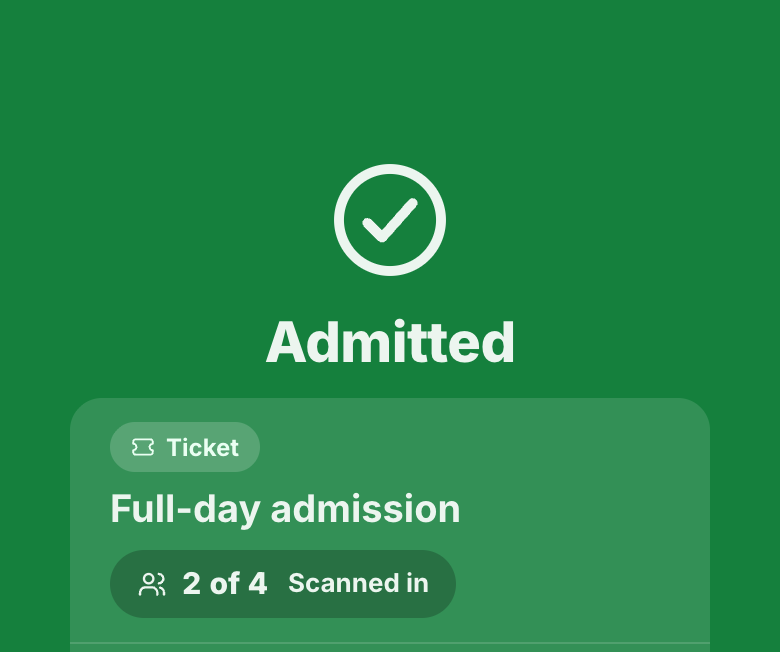 AdmittedFull-day admission, 2 of 4 in
One word, one shape
ADMIT, CHECK TICKET or NOT VALID, with the reason.
Gate and scanning questions
What hardware do we need?
Any modern phone or tablet. The app installs from the browser with no app store, and works with Bluetooth or USB scanners and rugged handhelds too.
How fast is a scan?
About a tenth of a second, and it is built for more than 1,200 scans a minute.
What happens if the wifi drops at the gate?
The scanner pauses and says so, then reconnects. It never gives a wrong answer.
Do staff need logins at the gate?
No. A scanner is paired with a one-time code that expires in 15 minutes, and a paired scanner can scan and nothing else. A lost device is revoked in one click.
Can one pass work at more than one gate?
Yes, through zones. A VIP pass can cover general entry and a VIP function, while wrong-gate scans are refused and nothing is used up.
See it running for your venue.
Every demo is built around your venue. We base it on your own website, events and prices, so you can see exactly what changes for your guests and your team.
Request a demo
An honest conversation with the people who built it.